Azure vSBC App Registration for Teams Direct Routing

For virtual SBC to be connected with the M365 Tenant and this will be done via Azure App Registration - Direct Routing SBA - Microsoft Teams | Microsoft Docs

above article shows given the requirement but thought it will be better if someone write about the steps 

It has 4 major steps (Not really major :) )

1. Register the application

2. Set the implicit grant tokens

3. Set the API permissions 

4. Create the client secret

However, for above steps even to start you will required the Azure Tenant Permission after you create the vSBC on it. 

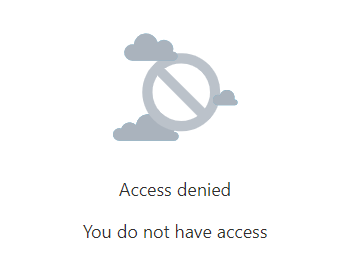
Following screen you will receive if permission is not available when you try to create an app on Azure AD


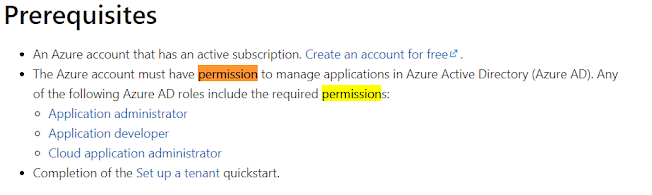
Permission require: for this question to answer wont be able to find it on above Direct Routing SBA article and it will be mention on this - Quickstart: Register an app in the Microsoft identity platform - Microsoft Entra | Microsoft Docs

Once you have above permission/one of the permission 

Cloud Application/Application administrator or Developer
Access the portal - https://portal.azure.com or https://aad.portal.azure.com 
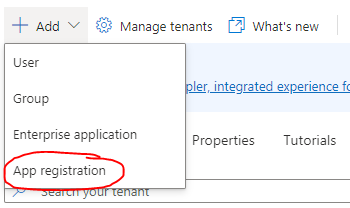


Create App registration and provide a name for Application. select the account/tenant name and click register.

Redirect url can be optional at this point 


There will be Application (client) ID, Object ID, Directory (tenant) ID will be there. 


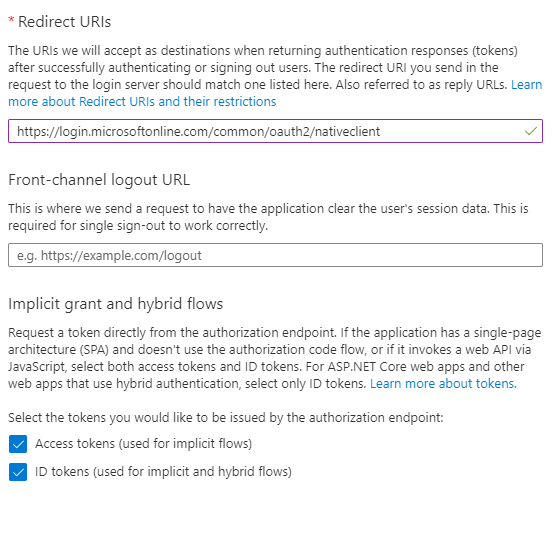
Next we will required to add the platform and it is under authentication section. Select authentication and click add platform on that windows will take us to  platform types and we will required to choice web and provide/insert url given in the Microsoft Article provided.
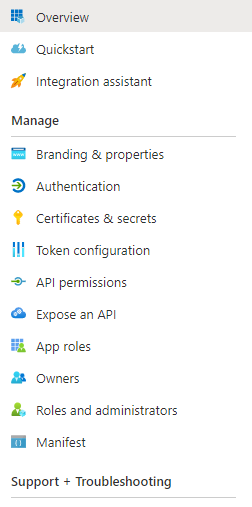

Web option selected in the following step 


make sure check the following options in the implicit grant and hybrid flows and click configure. 


Next will be API Permission 
Go to the API Permission and click add permission.


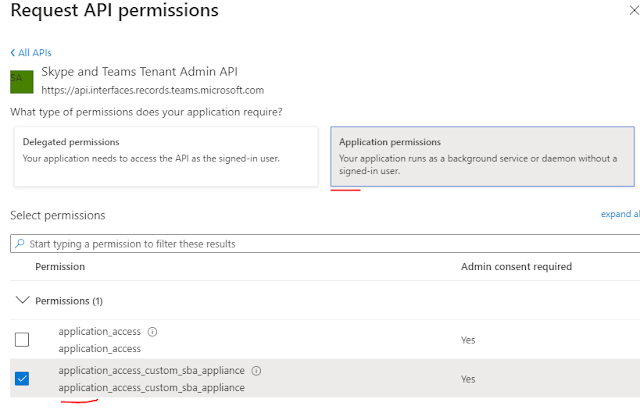
This take us to REQUEST permission section and it will have following options and we will required to select API my organization uses. 

You will be able to search existing list of which is my org/tenant already have and in use. 

Look for Skype and Teams Tenant Admin API 


Required to provide permission for application in the following section 


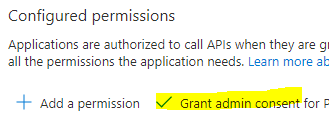
Once you add it will shows grant pending permission and it should be grant manually this section itself. 


Next will be Application secret 


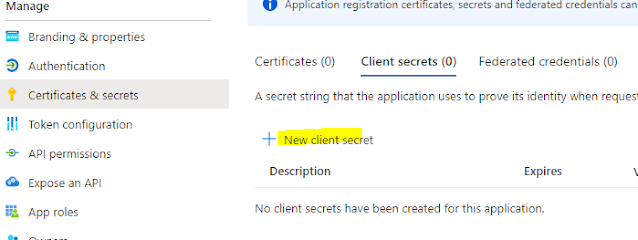
Go to the certificates and secrets section and 


Select the New client secret and add the name for the secret and define the expiration period. In my case i added 24 months since my public cert also 12 months renewal. So its good to aware we have some stuffs and expiration while IT folk are in sleep :) 


this will provide the Client Value and Secret ID and which we need for SBC configuration. Following window might be different from Ribbon to AudioCodes however both required Azure App registration for vSBCs.

Classic mistake i did was coping the Secret ID provided below because in Microsoft article says Application (Client ID) and Client secret. 

Following is from Azure App registration. 


I copied the Secret ID (which is wrong) instead of that it should be Value should be copied and thats the client secret.

Thanks to Nathan, he had a chance to work on App registration for another product prior and he was showing the mistake.


Comments

Popular posts from this blog

Skype for Business announces new Mac client and new mobile sharing experiences

Today Skype for business team publically announce that Skype for business Mac is available to download ( URL ) Its is supporting edge to edge video and full immersive content sharing and viewing, You can get good collaboration experience. And they have updated Skype Operation Framework also about this update. Please refer to them https://www.skypeoperationsframework.com/blogs Enjoy!!!

This Web browser or operating system might not be compatible with Microsoft Silverlight

Crazy error getting from Silver Light while your trying to open newly installed skype for business 2015 on top of Windows Server 2016. Since i installed Silverlight already i was checking control panel the version what i installed its latest and which you can confirm by going to this URL -  https://www.microsoft.com/getsilverlight/locale/en-us/html/Microsoft%20Silverlight%20Release%20History.htm     According to above web and control panel it says same version but my setup cant access the configuration wizard getting following error. to fix nothing do just that add this URL ( https://<pool01FQDN>/cscp to trusted sites and refresh the page then this will go. Note: This error will mislead to check on other browser version and etc and you might check supported version for WinSvr 2016. No required those. Hope this will save your time. Please like FB pages you find more - https://www.facebook.com/office365wwc/   SfB - https://w...

Microsoft Teams user administration using Set-CsOnlineVoicemailUserSettings

Now tenant admin can help with user for custom greetings,  DefaultGreetingPromptOverwrite and  DefaultOofGreetingPromptOverwrite many other user settings on behalf of users. This may help to end users when they are away to set up forwarding rules to another colleague or external number etc. Set-CsUserCallingSettings  -Identity "madushka@abc.com"  -IsForwardingEnabled $True -ForwardingType Immediate -ForwardingTarget taniya@abc.com -ForwardingTargetType SingleTarget - Verbose Note : You must have PhoneSystem License attached for you to have this forwarding to a another person. Basically both users must have PhoneSystem License.  Forward to external number   when you try this make sure you are using E.164 standard for phone numbers.  Set-CsUserCallingSettings -Identity " madushka@abc.com"   -IsForwardingEnabled $True -ForwardingType Simultaneous -ForwardingTargetType SingleTarget -ForwardingTarget "+1365888xxx"  - Verbose Note : You...