
Teams - SfB Hybrid and federation

Hosting Provider 

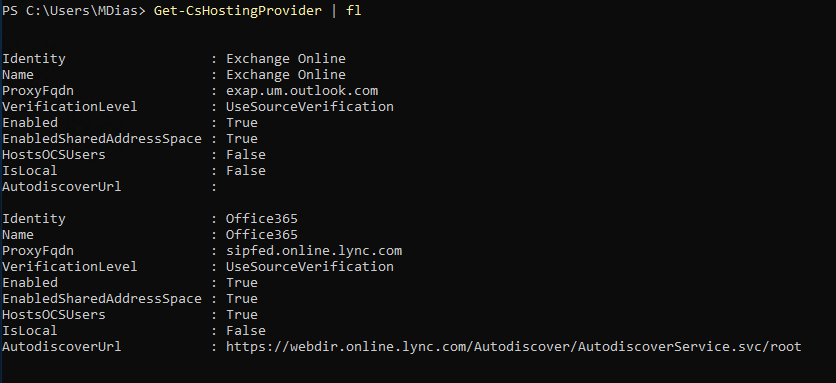
To share the same SIP address in On-prem and online (Teams) required hybrid to set/change Hosting Provider. 

for you to run get-cshostingProvider you will required Skype for business Online (old) module or Skype for business ISO mount and install the tools.

Hosting provider identity should be Office365 

Proxy FQDN should be "sipfed.online.lync.com"

Enable to $True

Enabled Shared Address Space $True

Host OCSUsers    $True

VerificationLevel    $True

AutoDiscoverUrl  need to set https://webdir.online.lync.com/Autodiscover/AutodiscoverService.svc/root


Tenant Federation Configuration 

SharedSIPAddressSpace should be True 


Access Edge Configuration 

Make sure set all the important properties you need to True 


Comments

  1. There are restrictions on how much of your bonus cash you could withdraw. It is the maximum amount of precise cash find a way 메리트카지노 to|you presumably can} win in a casino. Always verify the cap to certain you|ensure you|be sure to} obtain an inexpensive sum. For instance, when you deposit $100, have the ability to|you presumably can} withdraw at least of|no less than} $1000.

    ReplyDelete

Post a Comment

Popular posts from this blog

Skype for Business announces new Mac client and new mobile sharing experiences

Today Skype for business team publically announce that Skype for business Mac is available to download ( URL ) Its is supporting edge to edge video and full immersive content sharing and viewing, You can get good collaboration experience. And they have updated Skype Operation Framework also about this update. Please refer to them https://www.skypeoperationsframework.com/blogs Enjoy!!!

This Web browser or operating system might not be compatible with Microsoft Silverlight

Crazy error getting from Silver Light while your trying to open newly installed skype for business 2015 on top of Windows Server 2016. Since i installed Silverlight already i was checking control panel the version what i installed its latest and which you can confirm by going to this URL -  https://www.microsoft.com/getsilverlight/locale/en-us/html/Microsoft%20Silverlight%20Release%20History.htm     According to above web and control panel it says same version but my setup cant access the configuration wizard getting following error. to fix nothing do just that add this URL ( https://<pool01FQDN>/cscp to trusted sites and refresh the page then this will go. Note: This error will mislead to check on other browser version and etc and you might check supported version for WinSvr 2016. No required those. Hope this will save your time. Please like FB pages you find more - https://www.facebook.com/office365wwc/   SfB - https://w...

Microsoft Teams user administration using Set-CsOnlineVoicemailUserSettings

Now tenant admin can help with user for custom greetings,  DefaultGreetingPromptOverwrite and  DefaultOofGreetingPromptOverwrite many other user settings on behalf of users. This may help to end users when they are away to set up forwarding rules to another colleague or external number etc. Set-CsUserCallingSettings  -Identity "madushka@abc.com"  -IsForwardingEnabled $True -ForwardingType Immediate -ForwardingTarget taniya@abc.com -ForwardingTargetType SingleTarget - Verbose Note : You must have PhoneSystem License attached for you to have this forwarding to a another person. Basically both users must have PhoneSystem License.  Forward to external number   when you try this make sure you are using E.164 standard for phone numbers.  Set-CsUserCallingSettings -Identity " madushka@abc.com"   -IsForwardingEnabled $True -ForwardingType Simultaneous -ForwardingTargetType SingleTarget -ForwardingTarget "+1365888xxx"  - Verbose Note : You...