
Azure vSBC App Registration for Teams Direct Routing (Cont)

Teams SBA registration was showing different errors due to couple reasons and this article share the experience i went through on that. 

This is the 3rd error

Classic mistake i did was coping the Secret ID provided below because in Microsoft article says Application (Client ID) and Client secret. 


I copied the Secret ID (which is wrong) instead of that it should be Value should be copied and thats the client secret.

Following is from Azure App registration. 

Thanks to Nathan, he had a chance to work on App registration for another product prior and he was showing the mistake.


This was the 1st issue which i faced, during that time i created the secret ID and App ID which i was used in wrong way but the error message i got was nothing to do with it. My expectation was is secret is wrong then Auth failure in seconds.


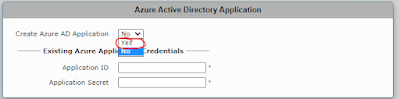
This was the 2nd issue, This came when i try to do it on the SBA by providing Azure Application credential (being global administrator will do) 

One of the following permission will do and check the Microsoft Article on App registration on Azure - 
Quickstart: Register an app in the Microsoft identity platform - Microsoft Entra | Microsoft Docs

-     Application administrator
-     Application developer
-     Cloud application administrator


Comments

  1. app is one of those applications that makes more sense after reading a detailed guide like this. The article was very useful because I was specifically looking for information about Xuper TV APK and how it works. What I like most is the simple interface and the ability to explore different content from one place. My experience so far has been comfortable, especially when switching between different sections. Xuper TV APK also feels convenient when I want something easy to navigate instead of spending a long time adjusting settings. The article answered many of my basic questions and gave me useful information before continuing with the application https://xupertvpc.com/.

    ReplyDelete
  2. This app seems like a practical option for people who enjoy watching different types of content on their devices. Your article was especially useful because you explained the experience in a way that was easy to understand. After installing the Freecine APK, I spent some time exploring the menus and different sections. Everything felt familiar, so I did not need much time to understand how the application worked. I also appreciated the installation information in your article because it made the process less confusing. Posts like this are helpful when someone wants to learn about an app https://freecine.com.br/ before spending time testing every feature independently.

    ReplyDelete
  3. App has become one of the applications I open regularly. Before installing it, I read your article, and I found it incredibly helpful because it explained the important features without making things complicated. After using Xuper Hydra APK, I noticed that the app runs smoothly and offers a comfortable user experience. I like how easy it is to browse through different sections, and the overall performance has remained stable. Your review matched my own experience very well. Thank you for sharing such valuable information, and I hope you continue publishing more useful articles like this https://xuperhydra.net/.

    ReplyDelete

Post a Comment

Popular posts from this blog

Skype for Business announces new Mac client and new mobile sharing experiences

Today Skype for business team publically announce that Skype for business Mac is available to download ( URL ) Its is supporting edge to edge video and full immersive content sharing and viewing, You can get good collaboration experience. And they have updated Skype Operation Framework also about this update. Please refer to them https://www.skypeoperationsframework.com/blogs Enjoy!!!

This Web browser or operating system might not be compatible with Microsoft Silverlight

Crazy error getting from Silver Light while your trying to open newly installed skype for business 2015 on top of Windows Server 2016. Since i installed Silverlight already i was checking control panel the version what i installed its latest and which you can confirm by going to this URL -  https://www.microsoft.com/getsilverlight/locale/en-us/html/Microsoft%20Silverlight%20Release%20History.htm     According to above web and control panel it says same version but my setup cant access the configuration wizard getting following error. to fix nothing do just that add this URL ( https://<pool01FQDN>/cscp to trusted sites and refresh the page then this will go. Note: This error will mislead to check on other browser version and etc and you might check supported version for WinSvr 2016. No required those. Hope this will save your time. Please like FB pages you find more - https://www.facebook.com/office365wwc/   SfB - https://w...

Microsoft Teams user administration using Set-CsOnlineVoicemailUserSettings

Now tenant admin can help with user for custom greetings,  DefaultGreetingPromptOverwrite and  DefaultOofGreetingPromptOverwrite many other user settings on behalf of users. This may help to end users when they are away to set up forwarding rules to another colleague or external number etc. Set-CsUserCallingSettings  -Identity "madushka@abc.com"  -IsForwardingEnabled $True -ForwardingType Immediate -ForwardingTarget taniya@abc.com -ForwardingTargetType SingleTarget - Verbose Note : You must have PhoneSystem License attached for you to have this forwarding to a another person. Basically both users must have PhoneSystem License.  Forward to external number   when you try this make sure you are using E.164 standard for phone numbers.  Set-CsUserCallingSettings -Identity " madushka@abc.com"   -IsForwardingEnabled $True -ForwardingType Simultaneous -ForwardingTargetType SingleTarget -ForwardingTarget "+1365888xxx"  - Verbose Note : You...