Microsoft Teams Auto Attendant/Call Queue - We can't upload the audio file. Verify the contents of the file and try again.

Many companies are migrating to Teams Voice, transitioning from legacy PBXs such as Cisco, Avaya, and Coral. In the past, for Hunt and IVR voice prompts, they would reach out to professionals or companies that specialize in these prompts, or they would record them internally as a low-cost option.

Option #1: You can convert speech to text and use it for Teams CQ/AA greetings and menus.

Option #2: You can use existing WAV or MP3 files and upload them as they are.

I decided to write this article based on my own experiences with various failures, such as the following:


Error: Microsoft Teams Auto Attendant/Call Queue - We can't upload the audio file. Verify the contents of the file and try again.


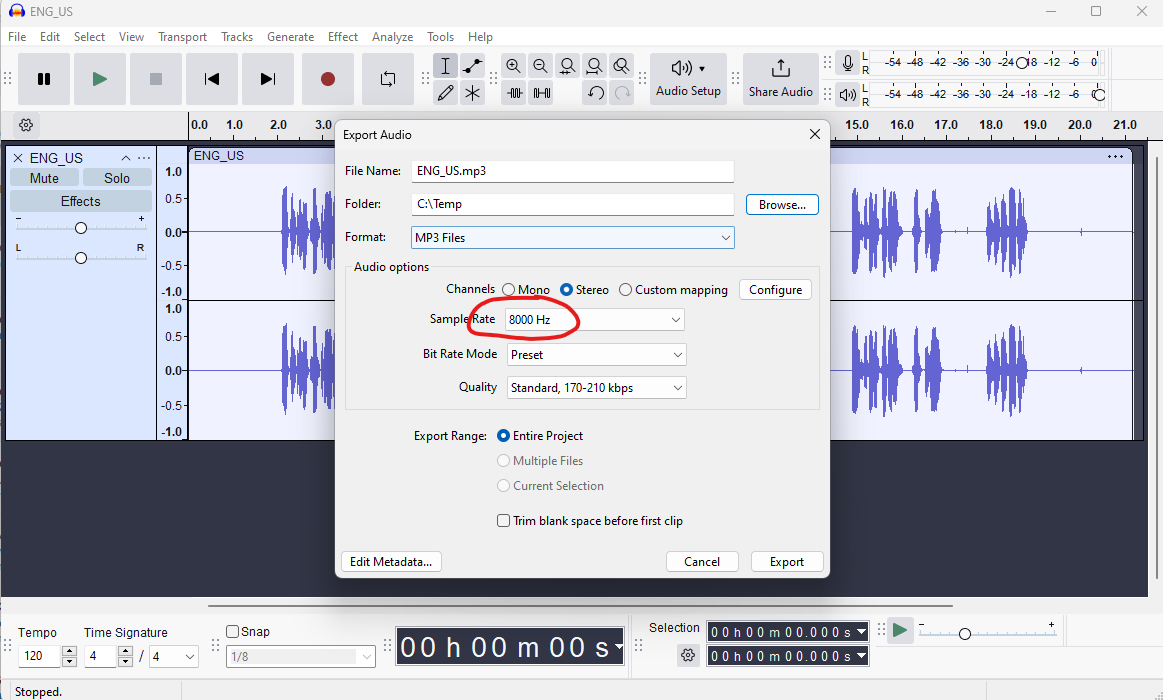
Solution: Change the sampling rate to something Teams CQ&AA supported. 

https://techcommunity.microsoft.com/t5/microsoft-teams/phone-system-upload-wav-greeting-to-call-queue/m-p/1525267 

How it is been done: I had heard about this tool before, but I was recently convinced by my colleague Lawrence, and it's a free tool. I’ve seen similar articles, but I’ve never come across one that offers a proper resolution


Open the existing WAV or MP3 file; it doesn't matter what sample rate it was recorded at as long as you can listen to it. If you don’t need to cut or change anything, the next step is to EXPORT. 

What I did was export to a low sample rate of 8000 Hz, without making any other changes in the following window.


Export to file location,


Upload this file afterward to Teams CQ/AA; it should work without any problems. This method was also used recently with WebEx Contact Center.


Comments

Popular posts from this blog

Skype for Business announces new Mac client and new mobile sharing experiences

Today Skype for business team publically announce that Skype for business Mac is available to download ( URL ) Its is supporting edge to edge video and full immersive content sharing and viewing, You can get good collaboration experience. And they have updated Skype Operation Framework also about this update. Please refer to them https://www.skypeoperationsframework.com/blogs Enjoy!!!

This Web browser or operating system might not be compatible with Microsoft Silverlight

Crazy error getting from Silver Light while your trying to open newly installed skype for business 2015 on top of Windows Server 2016. Since i installed Silverlight already i was checking control panel the version what i installed its latest and which you can confirm by going to this URL -  https://www.microsoft.com/getsilverlight/locale/en-us/html/Microsoft%20Silverlight%20Release%20History.htm     According to above web and control panel it says same version but my setup cant access the configuration wizard getting following error. to fix nothing do just that add this URL ( https://<pool01FQDN>/cscp to trusted sites and refresh the page then this will go. Note: This error will mislead to check on other browser version and etc and you might check supported version for WinSvr 2016. No required those. Hope this will save your time. Please like FB pages you find more - https://www.facebook.com/office365wwc/   SfB - https://w...

Microsoft Teams user administration using Set-CsOnlineVoicemailUserSettings

Now tenant admin can help with user for custom greetings,  DefaultGreetingPromptOverwrite and  DefaultOofGreetingPromptOverwrite many other user settings on behalf of users. This may help to end users when they are away to set up forwarding rules to another colleague or external number etc. Set-CsUserCallingSettings  -Identity "madushka@abc.com"  -IsForwardingEnabled $True -ForwardingType Immediate -ForwardingTarget taniya@abc.com -ForwardingTargetType SingleTarget - Verbose Note : You must have PhoneSystem License attached for you to have this forwarding to a another person. Basically both users must have PhoneSystem License.  Forward to external number   when you try this make sure you are using E.164 standard for phone numbers.  Set-CsUserCallingSettings -Identity " madushka@abc.com"   -IsForwardingEnabled $True -ForwardingType Simultaneous -ForwardingTargetType SingleTarget -ForwardingTarget "+1365888xxx"  - Verbose Note : You...